Highlights tone sandhi changes in Taiwanese romanization on the MOE dictionary site.
Users
15
−1 in 30 days
Rating
0.0 / 5
unchanged in 30 days
Ratings
0
0 in 30 days
Store rank
#167K
#140K among extensions
Version
1.6
updated 7 Jan 2026
Users
monthly, 14 months
Latest, 16 Oct 2026:15 usersMove the mouse over the chart for any month
Ratings count
monthly, 14 months
Latest, 16 Oct 2026:0 ratingsMove the mouse over the chart for any month
The Chrome Web Store rounds user counts down to the leading digit, so the user line moves in steps. The ratings count is exact and is the better signal of real adoption.
About taigi-sandhi-visualization
# 台語變調視像化 taigi-sandhi-visualization
A browser extension/userscript that highlights tone sandhi changes in Taiwanese Hokkien romanization on the [MOE Taiwanese Dictionary](https://sutian.moe.edu.tw/).
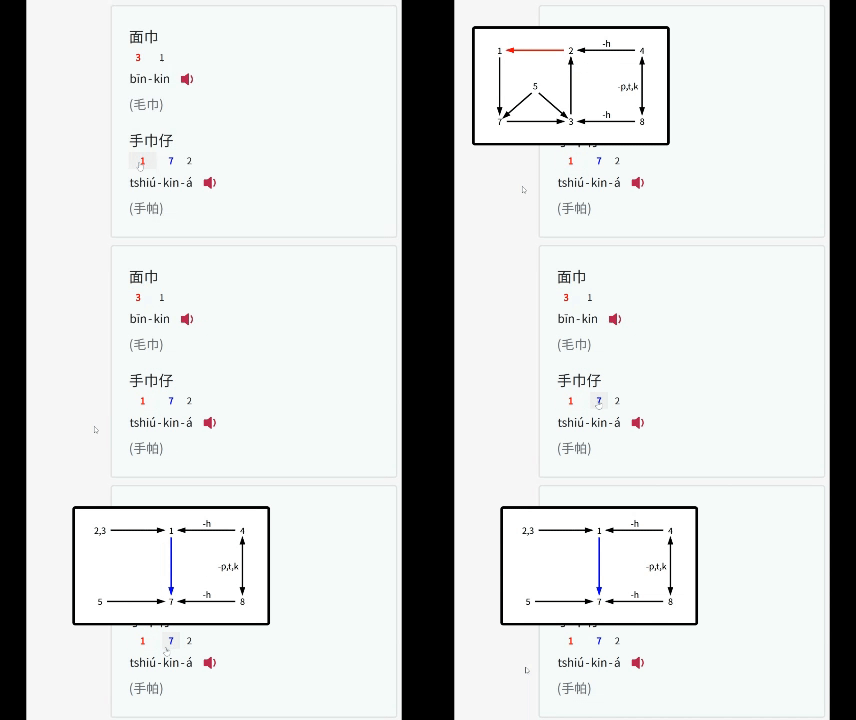
## Features
- **Tone Sandhi Highlighting**:
- Automatically detects and highlights tone changes in Taiwanese romanization text on the MOE dictionary site.
- Tone changes for every syllable except for the last one in a phrase.
- Tone sandhi for three common accents (Referenced from [link1](https://zh.wikipedia.org/zh-tw/閩南語音系#一般聲調), [link2](https://zh.wikipedia.org/zh-tw/臺灣話#連讀變調))
- 南部腔 Southern (偏漳腔 Zhangzhou-leaning)
- 北部腔 Northern (偏泉腔 Quanzhou-leaning)
- 海口腔 Seaport / Coastal (泉州腔 Quanzhou)
- **Color Coding**:
- **Red**: Normal tone sandhi.
- **Blue**: Tone sandhi before the `-á` suffix.
- **Green**: Neutral tones.
- **Tooltips**: Clicking a highlighted syllable to view the tone sandhi diagram.
## Installation
### Option 1: Browser Extension
| Platform | Supported Browsers | Userscript Manager |
|----------|--------------------|--------------------|
| Desktop | Chrome, Brave, Safari, Firefox, Edge | Tampermonkey, Violentmonkey, Greasemonkey |
| Android | Firefox, Edge | Tampermonkey, Violentmonkey |
| iOS | Orion | Userscript (Free), Tampermonkey (USD 2.99) |
- Install from the [Firefox Add-ons Store](https://addons.mozilla.org/en-US/firefox/addon/taigi-sandhi-visualization/) or [Chrome Web Store](https://chromewebstore.google.com/detail/ljkpjdedglglmhnggjhhapmdknjelppa).
### Option 2: Userscript Manager
| Platform | Supported Browsers | Userscript Manager |
|----------|--------------------|--------------------|
| Desktop | Chrome, Brave, Safari, Firefox, Edge | Tampermonkey, Violentmonkey, Greasemonkey |
| Android | Firefox, Edge | Tampermonkey, Violentmonkey |
| iOS | Safari | Userscript (Free), Tampermonkey (USD 2.99) |
1. Add the Userscript:
- **Greasy Fork (Recommended)**: Click [Here](https://greasyfork.org/en/scripts/545891-taigi-sandhi-visualization) and install the script directly by clicking **"Install this script"**.
- Otherwise, copy the script directly from [`taigi-sandhi-visualization.user.js`](https://raw.githubusercontent.com/hey0wing/taigi-sandhi-visualization/main/taigi-sandhi-visualization.user.js), and paste the code.
2. Install via Userscript Manager:
- Follow the [Greasy Fork tutorial](https://greasyfork.org/en/help/installing-user-scripts) to install one.
- Or install Tampermonkey (*Recommended*), Violentmonkey or Greasemonkey on your own
## Planned Improvements
- Add Chao's Tone letter / Pitch contour for visualization
- Real-time audio conversion(?)
## Credits
- Inspired by [https://github.com/Aiuanyu/KIPSutian-autoplay](https://github.com/Aiuanyu/KIPSutian-autoplay)
- Inspired by [https://github.com/andreihar/taibun.js](https://github.com/andreihar/taibun.js)
## License
This project is licensed under the [MIT License](LICENSE).


 Google Translate38M users · 3.0 ★ · 44,852 ratings
 Kami for Google Chrome™17M users · 3.8 ★ · 8,398 ratings
 Gopher Buddy for Gopher for Chrome Premium9M users · 1.4 ★ · 20 ratings
 EndNote Click7M users · 2.1 ★ · 379 ratings
 i-Ready LockDown Browser7M users · 1.3 ★ · 58 ratings
 Equatio - Math made digital5M users · 2.5 ★ · 640 ratings
 Promethean® Screen Share3M users · 3.0 ★ · 61 ratings
 Eduphoria LockDown Browser3M users · 1.6 ★ · 43 ratings