Annoyed by the browser just download files with the same name by just appending "(1)" "(2)" to the filename without your…
Users
1,000
0 in 30 days
Rating
2.6 / 5
−0.19 in 30 days
Ratings
9
+1 in 30 days
Store rank
#28K
#23K among extensions
Version
0.1
updated 13 Jun 2026
Users
monthly, 3 years
Latest, 16 Oct 2026:1,000 usersMove the mouse over the chart for any month
Ratings count
monthly, 3 years
Latest, 16 Oct 2026:9 ratingsMove the mouse over the chart for any month
The Chrome Web Store rounds user counts down to the leading digit, so the user line moves in steps. The ratings count is exact and is the better signal of real adoption.
About Avoid Duplicate Downloads
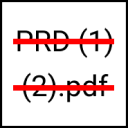
Annoyed by the browser just download files with the same name by just appending "(1)" "(2)" to the filename without your confirmation?
Chrome automatically appends (1) to the end of the filename if there's another file with the same name in the download folder.
If you are tired of having a lot of duplicates files in your download folder, look no further.
With this extension, you'll be prompted with "save as" dialog for you to choose either rename the downloading file or overwrite the existing file.
No more filename(1).pdf in your Downloads folder.
This is also an open source project:
https://github.com/hlwjia/avoid-duplicate-downloads-chrome-ext
Growth
Window
Users
Change
Ratings
Rating
7 days
0
+0.0%
0
0.00
30 days
0
+0.0%
+1
−0.19
6 months
0
+0.0%
+3
−0.77
1 year
0
+0.0%
+5
−1.94
Chrome Web Store search rankings
Where Avoid Duplicate Downloads appears when people search the store, with the 30 day change

 Video Download Helper6M users · 4.7 ★ · 35,839 ratings
 Video Downloader Professional5M users · 4.6 ★ · 229,830 ratings
 Free Download Manager3M users · 3.8 ★ · 4,825 ratings
 Image Downloader2M users · 4.0 ★ · 2,644 ratings
 Video Downloader PLUS1M users · 2.1 ★ · 1,641 ratings
 Scopus Document Download Manager1M users · 1.8 ★ · 280 ratings
 video downloader - CocoCut900K users · 4.8 ★ · 11,129 ratings
 FetchV - Video Downloader for m3u8 & hls900K users · 4.9 ★ · 11,589 ratings